Loading...
Save/Publication Confirmation

Authentication Required for WIs images
Save in progress...
| Case nr | WI nr | Title | Edition | |
|---|---|---|---|---|
| No Case | 118330 | New Enterprise Architecture Viewer profile in native Aquila desktop | New feature | Aquila 6.2.22 |
|
Objectives Provide
a consultation and discovery tool for Hopex repository, combining the best of 2 worlds
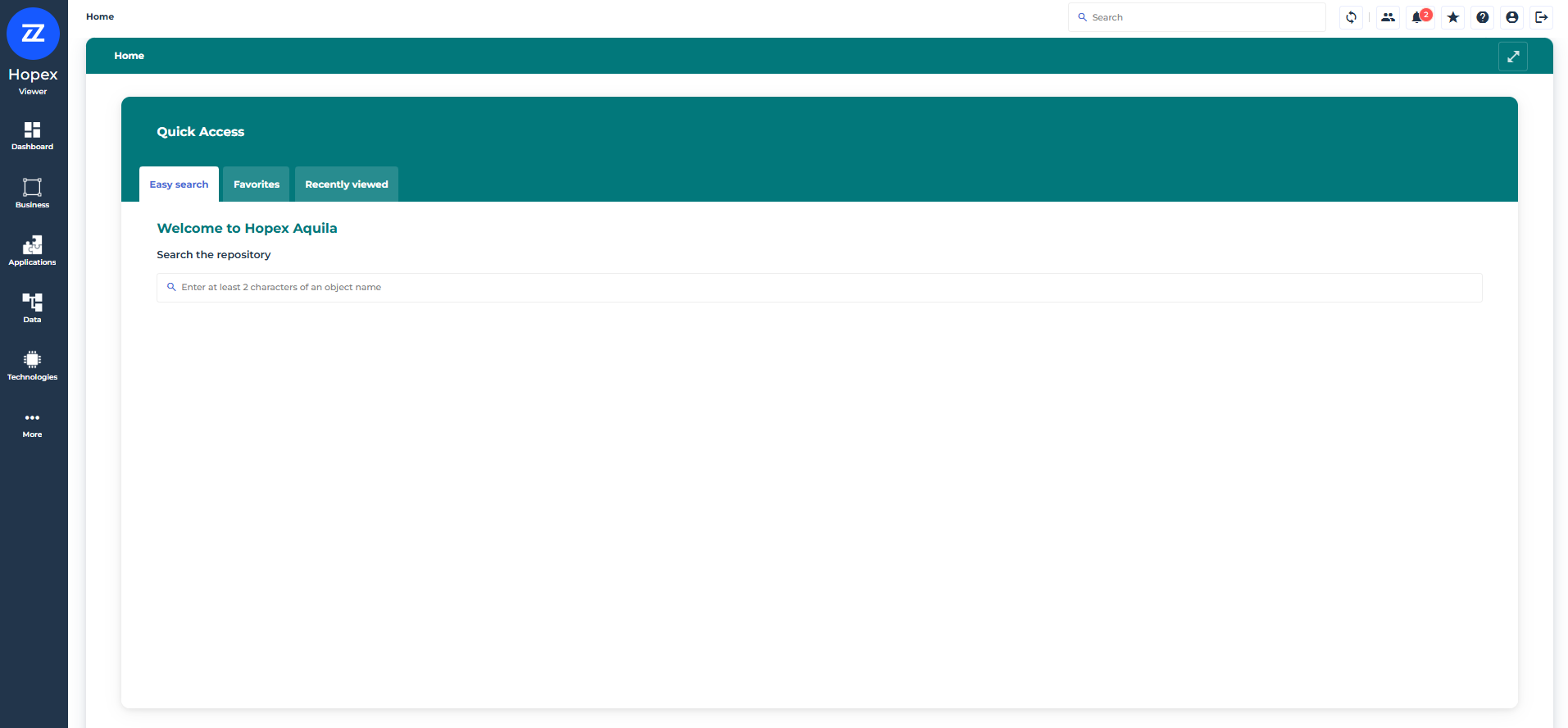 Content for "Viewer" profile A
new Home page, designed for non-specialist users
Simplified menus
Lighter
property pages for main objects
A
read-only UI but with collaboration features via review notes Standard additional navigation features are still available (open in new tab, select
displayed/hidden sections in page, browse panels etc.) Access to the new Dashboard (released in Aquila V6.2.15 and available across all EA desktops) 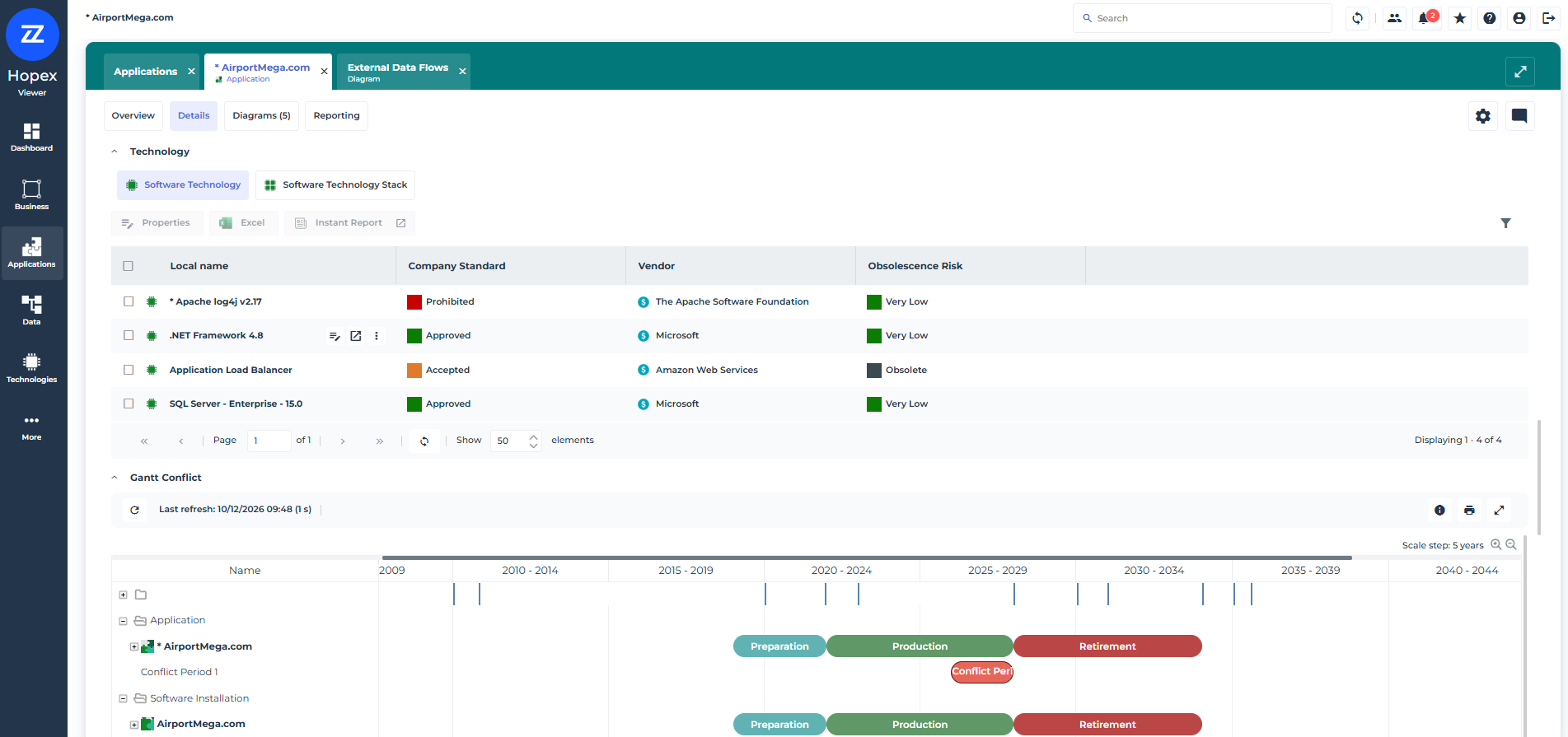 |
||||
| HSD-43063 | 124261 | Diagram Column Visibility Now Respects List Configuration | Fix | Aquila 6.2.22 |
|
An issue affecting the visibility of the Diagrams column in configured lists has been corrected. When a list is configured to hide the Diagrams column, the column is now correctly excluded and is no longer offered among the columns that can be displayed. |
||||
| No Case | 124479 | New Viewer Functional Administrator profile | New feature | Aquila 6.2.22 |
|
A new Viewer Functional Administrator profile has been introduced.This profile has a single main purpose: enabling the customization of property pages for the Viewer profile through the Easy Properties administration interfaces. The Viewer Functional Administrator profile is responsible for configuring the Viewer experience. In addition to customizing Viewer property pages, it also provides access to general administration features.
Key points
|
||||
| No Case | 124753 | Improved Error Handling for HOPEX Web Connection Failures | Fix | Aquila 6.2.22 |
|
HOPEX Web Front End error handling has been improved for connection failures occurring after repository and profile selection. Instead of returning users to the login page without explanation and potentially repeating the login cycle, an error page is now displayed when the connection cannot be completed. |
||||
| No Case | 125876 | Improved Feedback When Updating Protected Objects | Fix | Aquila 6.2.22 |
|
When a user attempts to add or remove a value from a multi-value field on a protected object without the required access rights, the application now consistently displays a warning. If the update is refused, the displayed values are refreshed to reflect the actual saved state of the object. |
||||
| No Case | 126063 | Enhanced Administrator Authentication Security | Fix | Aquila 6.2.22 |
|
Security has been strengthened for administrator authentication in HOPEX. Authentication now applies stricter validation of administrator credentials and required password changes before access is granted. This update also corrects administrator password handling during provisioning to ensure consistent behavior across supported database configurations. |
||||
| HSD-46923 | 126380 | Improved Stability in the ERQL Query Editor | Fix | Aquila 6.2.22 |
|
An issue affecting the ERQL Query Editor has been corrected. When using query completion, certain queries could unexpectedly terminate the web session. The editor now handles this scenario without interrupting the session, improving stability when creating or editing ERQL queries. |
||||
| No Case | 126478 | Fixing read-only mode in List and TreeList | Fix | Aquila 6.2.22 |
|
We fixed read-only mode in List and TreeList: columns with hyperlinks, drag & drop... |
||||
| HSD-43015 | 124184 | Existing ArchiMate Elements Can Be Found When Adding Objects to Diagrams | Fix | Aquila 6.2.22 |
|
An issue affecting the reuse of existing ArchiMate elements when editing diagrams has been corrected. Existing elements can now be found when searching for objects to add to an ArchiMate diagram, allowing users to reuse existing model elements as expected. |
||||
| HSD-46723 | 124911 | MCP Server Settings Available to Delegated Administrators | Fix | Aquila 6.2.22 |
|
HAS Delegated Administrators can now access and manage the MCP Server configuration from the HAS Console. This enables delegated administrators to update MCP Server settings while configuration access for other modules and global settings remains unchanged. |
||||
| HSD-44764 | 125946 | HOPEX MCP Server Settings Preserved After Upgrade | Fix | Aquila 6.2.22 |
|
An issue has been corrected where HOPEX MCP Server settings could be ignored after an upgrade on certain SQL Server database configurations, causing the module to use default settings instead of the configured values. Settings migration now correctly handles these database configurations, ensuring that existing HOPEX MCP Server settings remain effective after upgrade. |
||||
| HSD-44096 | 124941 | Corrected Logical-to-Physical Synchronization for Multiple Identifying Associations | Fix | Aquila 6.2.22 |
|
HOPEX now correctly handles logical-to-physical synchronization when multiple identifying associations reference the same entity. Previously, synchronization could select the same association more than once instead of the appropriate associations, resulting in an incorrect number of columns in the generated primary key and associated index. This behavior has been corrected. |
||||
| HSD-44786 | 124985 | The application sub-components tab was not showing the comments of the components | Fix | Aquila 6.2.22 |
|
The "Microservices" and "IT services" tabs of application page was not showing their comments. It is now fixed. |
||||
| HSD-45950 | 125820 | It was not possible to open the diagram of a Business Functional Area diagram | Fix | Aquila 6.2.22 |
|
When using the Business Functional Area Hierarchy view, a bug was preventing from opening the diagram of a Business Functional Area. It is now fixed. |
||||
| No Case | 126700 | Risk and Control management have been integrated into EA solution | New feature | Aquila 6.2.22 |
HOPEX Enterprise Architecture & Risk Management: Stronger TogetherOrganizations cannot successfully transform their business without understanding and managing risk. To better support this challenge, we have significantly enhanced Risk Management capabilities within HOPEX Enterprise Architecture, bringing risk analysis and architectural decision-making closer together. Enterprise Architecture and Risk Management are naturally connected. Architecture provides the business, application, data, and technology context needed to identify, assess, prioritize, and mitigate risks continuously rather than relying on periodic static assessments. With this new enhancement, Hopex now enables organizations to:
These capabilities support a wide range of enterprise use cases, including strategic risk alignment, technology risk assessment, project and portfolio risk management, cybersecurity, data protection, operational resilience, regulatory compliance, vendor risk management, and change impact analysis. By combining Enterprise Architecture and Risk Management within a single platform, organizations gain a clearer understanding of risk exposure, dependencies, and business impacts. Decision-makers can better anticipate threats, evaluate alternatives, and implement mitigation actions aligned with strategic objectives. The result is a more resilient enterprise, where risk management becomes an integral part of architecture governance and transformation planning, enabling informed decisions and sustainable business change. 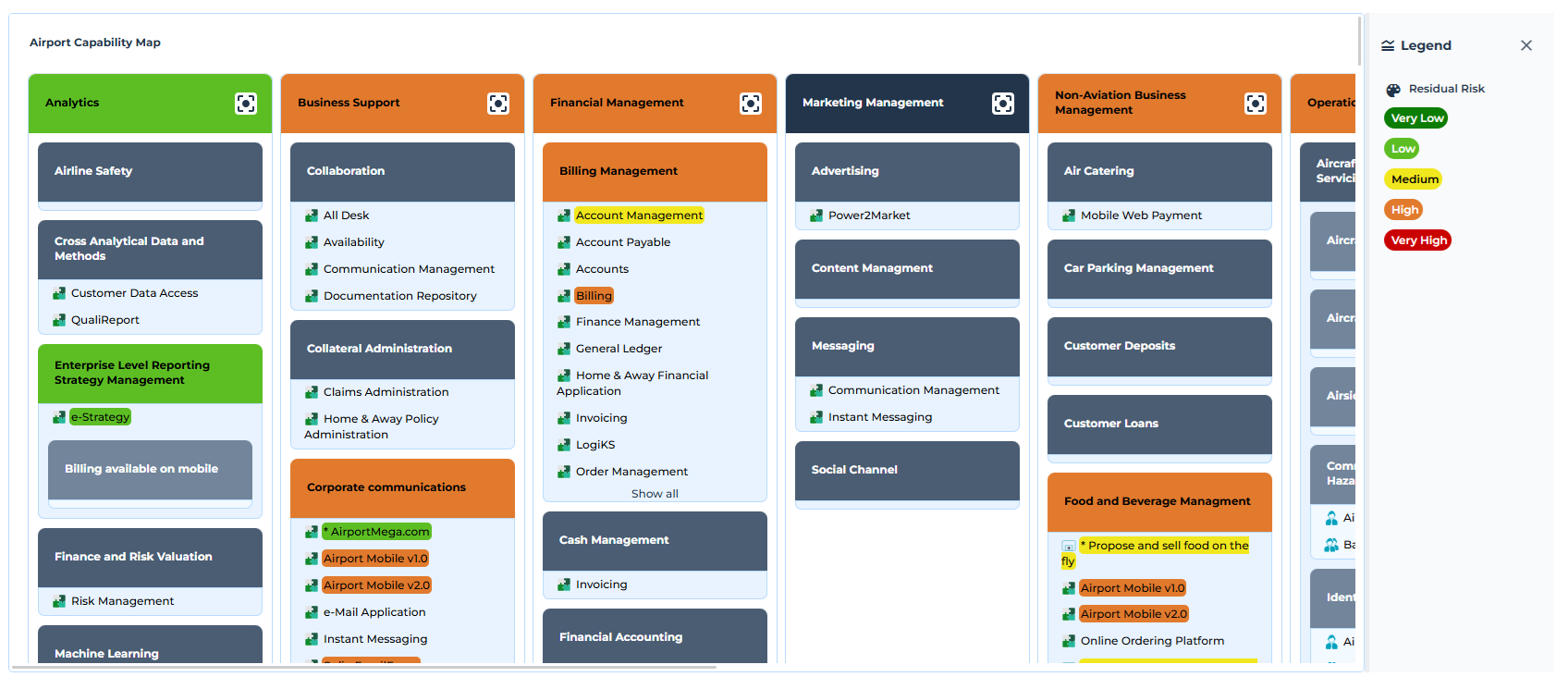 |
||||
| HSD-44893 | 125047 | Improved meta field component creation wizard | Change | Aquila 6.2.22 |
|
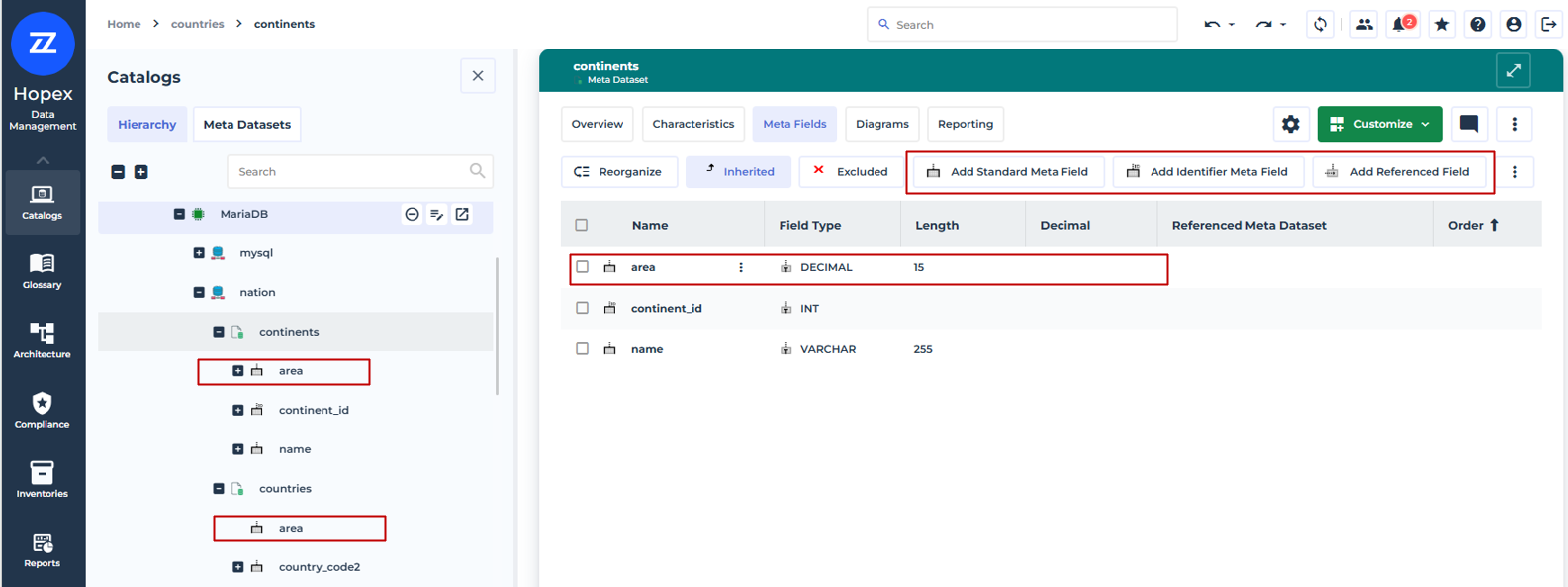
The metadata field component creation wizard has been improved and has resolved the issue of creating fields with the same name but different properties (type, length, decimal). The wizard now offers three buttons to add fields:
 |
||||
| HSD-46390 | 126078 | Deployed Data Store Icon Display Restored | Fix | Aquila 6.2.22 |
|
The visual icon for the Deployed Data Store is now correctly displayed again in HOPEX. This fixes a regression where the icon was no longer visible, including when viewing the metaclass through Advanced Search. |
||||
| HSD-46678 | 126222 | Direct Control Assessment Template Availability Corrected | Fix | Aquila 6.2.22 |
|
The availability of assessment templates for direct control assessments has been corrected. The“Control Assessment by Entity and Regulatory Framework” template, which is designed to be used through an assessment campaign, is no longer offered when performing a direct control assessment. This prevents unsuccessful assessments where no assessment result was created. |
||||
| HSD-47093 | 126550 | Checklist on internal controls does check mandatory answers. | Limit | Aquila 6.2.22 |
|
The checklist on internal controls does not validate mandatory answers. To enforce mandatory answers, use the new questionnaire mode. |
||||
| HSD-46790 | 126331 | Audit Director Can Close Audits in the Standard Audit Workflow | Fix | Aquila 6.2.22 |
|
A regression in the standard Audit workflow has been corrected. Users with the Audit Director profile can once again move an audit from“To be Closed” to“Closed”, restoring the expected workflow behavior.
|
||||
1. All Products
New feature
-
New Enterprise Architecture Viewer profile in native Aquila desktopAquila 6.2.22ObjectivesProvide a consultation and discovery tool for Hopex repository, combining the best of 2 worlds
- Simplicity of navigation and discovery features of Hopex 360 website
- The Viewer profile benefits from a simplified Hopex Aquila interface
- Real time data and personalization easiness of Hopex Aquila
- No generation time, data always fresh and up to date
- Native Aquila desktop UI/UX features
- No need to code/parameter web site generator for personalization
Content for "Viewer" profileA new Home page, designed for non-specialist users- The first thing a user sees is a new, simpler, and intuitive search engine
- Favorites and recently viewed objects are easily accessible
Simplified menus- The navigation bar is based on the 4 levels of Enterprise Architecture (and extensible to more expert objects)
- The main user menu has been streamlined by removing unnecessary features
- Contextual menus (right-click on objects) have been removed
Lighter property pages for main objects- The Details tab brings together what is important (other tabs from EA scope are hidden but remain available)
- Object lists have been simplified for better UX (search, Excel export, and instant report)
A read-only UI but with collaboration features via review notesStandard additional navigation features are still available (open in new tab, select displayed/hidden sections in page, browse panels etc.)Access to the new Dashboard (released in Aquila V6.2.15 and available across all EA desktops)
Not saved to ADOInternal reference 118330#User Interface#End user -
New Viewer Functional Administrator profileAquila 6.2.22
A new Viewer Functional Administrator profile has been introduced.
This profile has a single main purpose: enabling the customization of property pages for the Viewer profile through the Easy Properties administration interfaces.
The Viewer Functional Administrator profile is responsible for configuring the Viewer experience.
In addition to customizing Viewer property pages, it also provides access to general administration features.Key points
- Dedicated to the Viewer profile only.
- Enables customization of Viewer property pages through Easy Properties.
- Intended for functional administrators responsible for configuring the Viewer experience.
- Does not replace existing administration profiles for other user profiles or broader platform administration tasks.
Not saved to ADOInternal reference 124479#User Interface#Administrator

Fix
-
Fixing read-only mode in List and TreeListAquila 6.2.22We fixed read-only mode in List and TreeList: columns with hyperlinks, drag & drop...
Not saved to ADOInternal reference 126478#User Interface#End user -
Diagram Column Visibility Now Respects List ConfigurationAquila 6.2.22An issue affecting the visibility of the Diagrams column in configured lists has been corrected. When a list is configured to hide the Diagrams column, the column is now correctly excluded and is no longer offered among the columns that can be displayed.
Not saved to ADOInternal reference 124261#Case HSD-43063#User Interface#End user -
Enhanced Administrator Authentication SecurityAquila 6.2.22
Security has been strengthened for administrator authentication in HOPEX. Authentication now applies stricter validation of administrator credentials and required password changes before access is granted.
This update also corrects administrator password handling during provisioning to ensure consistent behavior across supported database configurations.
Not saved to ADOMigration guidelines
After upgrading, review any automation or tools that use the administrator account with its initial password. Such connections are now refused until the required password change has been completed.Internal reference 126063#Operations#Administrator -
Improved Error Handling for HOPEX Web Connection FailuresAquila 6.2.22HOPEX Web Front End error handling has been improved for connection failures occurring after repository and profile selection. Instead of returning users to the login page without explanation and potentially repeating the login cycle, an error page is now displayed when the connection cannot be completed.Not saved to ADOInternal reference 124753#User Interface#End user
-
Improved Feedback When Updating Protected ObjectsAquila 6.2.22When a user attempts to add or remove a value from a multi-value field on a protected object without the required access rights, the application now consistently displays a warning. If the update is refused, the displayed values are refreshed to reflect the actual saved state of the object.
Not saved to ADOInternal reference 125876#User Interface#End user -
Improved Stability in the ERQL Query EditorAquila 6.2.22An issue affecting the ERQL Query Editor has been corrected. When using query completion, certain queries could unexpectedly terminate the web session. The editor now handles this scenario without interrupting the session, improving stability when creating or editing ERQL queries.
Not saved to ADOInternal reference 126380#Case HSD-46923#User Interface#End user
2. HOPEX Archimate (HAM)
Fix
-
Existing ArchiMate Elements Can Be Found When Adding Objects to DiagramsAquila 6.2.22An issue affecting the reuse of existing ArchiMate elements when editing diagrams has been corrected. Existing elements can now be found when searching for objects to add to an ArchiMate diagram, allowing users to reuse existing model elements as expected.Not saved to ADOInternal reference 124184#Case HSD-43015#User Interface#End user
3. MCP Server
Fix
-
HOPEX MCP Server Settings Preserved After UpgradeAquila 6.2.22
An issue has been corrected where HOPEX MCP Server settings could be ignored after an upgrade on certain SQL Server database configurations, causing the module to use default settings instead of the configured values.
Settings migration now correctly handles these database configurations, ensuring that existing HOPEX MCP Server settings remain effective after upgrade.
Not saved to ADOInternal reference 125946#Case HSD-44764#Operations#Administrator -
MCP Server Settings Available to Delegated AdministratorsAquila 6.2.22HAS Delegated Administrators can now access and manage the MCP Server configuration from the HAS Console. This enables delegated administrators to update MCP Server settings while configuration access for other modules and global settings remains unchanged.
Not saved to ADOInternal reference 124911#Case HSD-46723#User Interface#Administrator
4. HOPEX Data Architecture
Fix
-
Corrected Logical-to-Physical Synchronization for Multiple Identifying AssociationsAquila 6.2.22HOPEX now correctly handles logical-to-physical synchronization when multiple identifying associations reference the same entity. Previously, synchronization could select the same association more than once instead of the appropriate associations, resulting in an incorrect number of columns in the generated primary key and associated index. This behavior has been corrected.Not saved to ADOInternal reference 124941#Case HSD-44096#User Interface#End user
5. HOPEX IT Architecture V2 (HITA)
Fix
-
The application sub-components tab was not showing the comments of the componentsAquila 6.2.22The "Microservices" and "IT services" tabs of application page was not showing their comments.It is now fixed.Not saved to ADOInternal reference 124985#Case HSD-44786#User Interface#End user
6. HOPEX IT Portfolio Management (APM)
New feature
-
Risk and Control management have been integrated into EA solutionAquila 6.2.22
HOPEX Enterprise Architecture & Risk Management: Stronger Together
Organizations cannot successfully transform their business without understanding and managing risk. To better support this challenge, we have significantly enhanced Risk Management capabilities within HOPEX Enterprise Architecture, bringing risk analysis and architectural decision-making closer together.
Enterprise Architecture and Risk Management are naturally connected. Architecture provides the business, application, data, and technology context needed to identify, assess, prioritize, and mitigate risks continuously rather than relying on periodic static assessments.
With this new enhancement, Hopex now enables organizations to:
- Identify and manage risks across multiple architectural levels and viewpoints.
- Maintain a consistent IT Risk Taxonomy to standardize risk analysis.
- Perform risk assessments directly within the architectural context.
- Analyze risk portfolios and prioritize mitigation efforts.
- Evaluate the impact of risks on business capabilities and transformation initiatives.
- Define and track risk remediation plans to reduce exposure over time.
These capabilities support a wide range of enterprise use cases, including strategic risk alignment, technology risk assessment, project and portfolio risk management, cybersecurity, data protection, operational resilience, regulatory compliance, vendor risk management, and change impact analysis.
By combining Enterprise Architecture and Risk Management within a single platform, organizations gain a clearer understanding of risk exposure, dependencies, and business impacts. Decision-makers can better anticipate threats, evaluate alternatives, and implement mitigation actions aligned with strategic objectives.
The result is a more resilient enterprise, where risk management becomes an integral part of architecture governance and transformation planning, enabling informed decisions and sustainable business change.
Not saved to ADOInternal reference 126700#Methodology#End user
Fix
-
It was not possible to open the diagram of a Business Functional Area diagramAquila 6.2.22When using the Business Functional Area Hierarchy view, a bug was preventing from opening the diagram of a Business Functional Area.It is now fixed.Not saved to ADOInternal reference 125820#Case HSD-45950#User Interface#End user
-
The application sub-components tab was not showing the comments of the componentsAquila 6.2.22The "Microservices" and "IT services" tabs of application page was not showing their comments.It is now fixed.Not saved to ADOInternal reference 124985#Case HSD-44786#User Interface#End user
7. HOPEX Data Governance (DGOV)
Change
-
Improved meta field component creation wizardAquila 6.2.22The metadata field component creation wizard has been improved and has resolved the issue of creating fields with the same name but different properties (type, length, decimal).
The wizard now offers three buttons to add fields:
- Add Standard Meta Field: to create a meta field component for example as standard columns
- Add Identifier Meta Field: to create meta field component as primary key column
- Add Referenced Field: to create meta field component as foreign key columns.
Not saved to ADOInternal reference 125047#Case HSD-44893#User Interface#End user
Fix
-
Deployed Data Store Icon Display RestoredAquila 6.2.22The visual icon for the Deployed Data Store is now correctly displayed again in HOPEX. This fixes a regression where the icon was no longer visible, including when viewing the metaclass through Advanced Search.Not saved to ADOInternal reference 126078#Case HSD-46390#User Interface#End user
8. HOPEX Business Architecture (HBAS)
Fix
-
It was not possible to open the diagram of a Business Functional Area diagramAquila 6.2.22When using the Business Functional Area Hierarchy view, a bug was preventing from opening the diagram of a Business Functional Area.It is now fixed.Not saved to ADOInternal reference 125820#Case HSD-45950#User Interface#End user
9. HOPEX Internal Control (ICM)
New feature
-
Risk and Control management have been integrated into EA solutionAquila 6.2.22
HOPEX Enterprise Architecture & Risk Management: Stronger Together
Organizations cannot successfully transform their business without understanding and managing risk. To better support this challenge, we have significantly enhanced Risk Management capabilities within HOPEX Enterprise Architecture, bringing risk analysis and architectural decision-making closer together.
Enterprise Architecture and Risk Management are naturally connected. Architecture provides the business, application, data, and technology context needed to identify, assess, prioritize, and mitigate risks continuously rather than relying on periodic static assessments.
With this new enhancement, Hopex now enables organizations to:
- Identify and manage risks across multiple architectural levels and viewpoints.
- Maintain a consistent IT Risk Taxonomy to standardize risk analysis.
- Perform risk assessments directly within the architectural context.
- Analyze risk portfolios and prioritize mitigation efforts.
- Evaluate the impact of risks on business capabilities and transformation initiatives.
- Define and track risk remediation plans to reduce exposure over time.
These capabilities support a wide range of enterprise use cases, including strategic risk alignment, technology risk assessment, project and portfolio risk management, cybersecurity, data protection, operational resilience, regulatory compliance, vendor risk management, and change impact analysis.
By combining Enterprise Architecture and Risk Management within a single platform, organizations gain a clearer understanding of risk exposure, dependencies, and business impacts. Decision-makers can better anticipate threats, evaluate alternatives, and implement mitigation actions aligned with strategic objectives.
The result is a more resilient enterprise, where risk management becomes an integral part of architecture governance and transformation planning, enabling informed decisions and sustainable business change.
Not saved to ADOInternal reference 126700#Methodology#End user
Fix
-
Direct Control Assessment Template Availability CorrectedAquila 6.2.22The availability of assessment templates for direct control assessments has been corrected. The“Control Assessment by Entity and Regulatory Framework” template, which is designed to be used through an assessment campaign, is no longer offered when performing a direct control assessment. This prevents unsuccessful assessments where no assessment result was created.Not saved to ADOInternal reference 126222#Case HSD-46678#User Interface#End user
Limit
-
Checklist on internal controls does check mandatory answers.Aquila 6.2.22The checklist on internal controls does not validate mandatory answers. To enforce mandatory answers, use the new questionnaire mode.Not saved to ADO
Limits
The checklist on internal controls does check mandatory answers.To check mandatory answer use the new questionnaire mode
Internal reference 126550#Case HSD-47093#User Interface#End user
10. HOPEX Internal Audit (MIAW)
Fix
-
Audit Director Can Close Audits in the Standard Audit WorkflowAquila 6.2.22A regression in the standard Audit workflow has been corrected. Users with the Audit Director profile can once again move an audit from“To be Closed” to“Closed”, restoring the expected workflow behavior.Not saved to ADOInternal reference 126331#Case HSD-46790#User Interface#End user
11. HOPEX Enterprise Risk Management (ERMW)
New feature
-
Risk and Control management have been integrated into EA solutionAquila 6.2.22
HOPEX Enterprise Architecture & Risk Management: Stronger Together
Organizations cannot successfully transform their business without understanding and managing risk. To better support this challenge, we have significantly enhanced Risk Management capabilities within HOPEX Enterprise Architecture, bringing risk analysis and architectural decision-making closer together.
Enterprise Architecture and Risk Management are naturally connected. Architecture provides the business, application, data, and technology context needed to identify, assess, prioritize, and mitigate risks continuously rather than relying on periodic static assessments.
With this new enhancement, Hopex now enables organizations to:
- Identify and manage risks across multiple architectural levels and viewpoints.
- Maintain a consistent IT Risk Taxonomy to standardize risk analysis.
- Perform risk assessments directly within the architectural context.
- Analyze risk portfolios and prioritize mitigation efforts.
- Evaluate the impact of risks on business capabilities and transformation initiatives.
- Define and track risk remediation plans to reduce exposure over time.
These capabilities support a wide range of enterprise use cases, including strategic risk alignment, technology risk assessment, project and portfolio risk management, cybersecurity, data protection, operational resilience, regulatory compliance, vendor risk management, and change impact analysis.
By combining Enterprise Architecture and Risk Management within a single platform, organizations gain a clearer understanding of risk exposure, dependencies, and business impacts. Decision-makers can better anticipate threats, evaluate alternatives, and implement mitigation actions aligned with strategic objectives.
The result is a more resilient enterprise, where risk management becomes an integral part of architecture governance and transformation planning, enabling informed decisions and sustainable business change.
Not saved to ADOInternal reference 126700#Methodology#End user